
Choosing the right overhead monitor with wireless headphones can make long drives quieter, more comfortable, and much more enjoyable for passengers. The best setups balance screen size, video quality, wireless range, and simple controls.
Below, we focus on practical differences that matter most in real-world use, from ceiling-mounted flip-down screens to bundled IR headphones and smarter media inputs.
Best 10 Overhead Monitors with Wireless Headphones Picks for 2026
Factory-Ready Family Bundle
10.1" Hi-Res Overhead DVD System

- Includes a 10.1-inch overhead monitor with 2 pairs of wireless headphones
- HDMI input works with smartphones and streaming sticks
- Also supports SD and USB playback
Best For: Families wanting a ready-made overhead entertainment bundle
Android Screen Upgrade
15.6" Motorized Ceiling Monitor

- Large 15.6-inch IPS screen with HDR10+ support
- Android system runs streaming apps over WiFi or hotspot
- Supports Bluetooth or infrared headphones
Best For: Shoppers wanting a smart overhead monitor with flexible audio options
Replacement Headphone Pick

- Works with most infrared overhead and headrest monitors
- Includes 2 AAA batteries
- Compact in-ear design for storage
Best For: Replacing a compatible headphone for existing rear-seat systems
Large-Screen Value Choice
15.6" Hi-Res Flip-Down Monitor
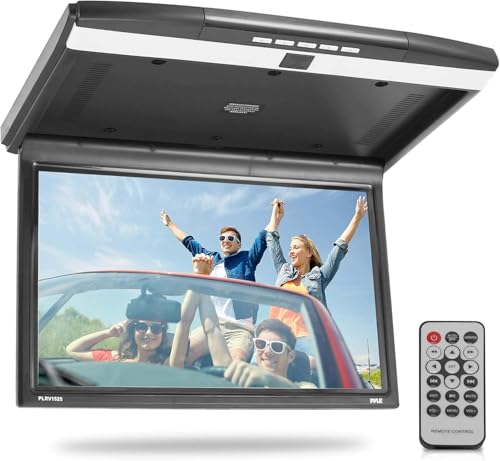
- 15.6-inch screen with 1680x800 resolution
- Built-in IR transmitter supports IR headphones
- HDMI, USB, SD, AV, and FM options
Best For: Drivers needing a large roof-mounted screen with flexible audio and video inputs
Flip-Down Screen Pick
Pyle 17.3" Vehicle Overhead Monitor

- 17.3-inch flip-down overhead LCD screen
- Built-in IR transmitter for wireless IR headphones
- HDMI, USB, RCA, and IR connectivity
Best For: Vehicle entertainment with wireless headphone listening
All-in-One DVD Pick
Audiovox VODP10 Overhead Monitor System

- Built-in DVD player with 10.1-inch LED display
- Includes two single-channel wireless headphones
- USB support plus optional HDMI/USB input
Best For: Families wanting an all-in-one rear-seat entertainment unit
Flip-Down HD Roof Monitor

- 13.3-inch widescreen LCD
- Built-in IR transmitter for wireless headphones
- HDMI, USB, and SD playback support
Best For: Families wanting a large overhead monitor with wireless headphone support
Wireless IR Bundle

- Includes 2 wireless IR headphones
- Built-in DVD player and overhead mount
- USB, SD, and AV connections
Best For: Buyers who want a complete monitor-and-headphones bundle
IR Replacement Headset

- IR wireless and wired AUX listening
- Works with many factory and aftermarket systems
- Lightweight with soft padded earpieces
Best For: Replacing or adding headphones for an existing IR video system
Factory-Ready Family Bundle – 10.1" Hi-Res Overhead DVD System
If you want overhead monitors with wireless headphones that are ready to use right out of the box, this Voxx Movies to Go package is built around a 10.1-inch overhead monitor and two single-channel wireless headphones. It adds HDMI, SD, and USB inputs, so you can connect a phone or streaming stick and keep passengers entertained without a complicated install.
Best For: Families who want an overhead entertainment system with included wireless headphones and broad media input support.
Pros:
- Includes a 10.1-inch hi-res LED overhead monitor and 2 pairs of wireless headphones
- HDMI input supports smartphones and streaming sticks
- Also accepts SD and USB media for flexible playback
- Works with most infrared overhead and headrest monitors
Cons:
- Native resolution is 1024×600, so it is not a high-end full-HD panel
- Headphones are single-channel, which may limit use in mixed setups
- At 21 pounds, it is heavier than compact screen-only options
This is a practical bundle if you want a complete overhead setup with wireless listening included. Its main advantage is convenience: monitor, media inputs, and headphones are all covered in one package.
Android Screen Upgrade – 15.6" Motorized Ceiling Monitor
For buyers comparing overhead monitors with wireless headphones, this 15.6-inch motorized ceiling monitor stands out for its Android-based streaming features and large IPS display. It is designed for cars, SUVs, and commercial vehicles, and it can connect through WiFi, hotspot, HDMI, USB, AV, or screen mirroring for flexible in-vehicle entertainment.
Best For: Drivers who want a large Android overhead monitor with multiple connection options and optional wireless headphone use.
Pros:
- Built-in Android system supports apps like Netflix, YouTube, Amazon Prime Video, and Hulu
- 15.6-inch IPS screen with HDR10+ and Full HD viewing
- Multiple inputs and mirroring options: HDMI, USB, AV, and screen mirroring
- Can output audio through Bluetooth or infrared headphones
Cons:
- Does not include external headphones in the listed package
- Built-in stereo speakers may reduce the need for headphones, but also make the setup less focused on private listening
- Advanced smart features may be more than some buyers need
This model makes sense if you want a modern, app-friendly roof-mounted screen first and wireless headphone support as a listening option. It is more about versatility and screen size than an all-in-one headphone bundle.
Replacement Headphone Pick – HP1 Single-Channel Wireless
Audiovox HP1 Wireless Headphones Single Channel Ir Faux Leather Ear Piece 2-aaa Included
Check Price On AmazonIf your goal is to support overhead monitors with wireless headphones, the Audiovox HP1 is a straightforward replacement or spare set made to work with most infrared overhead and headrest monitors. It is a single-channel wireless headphone that keeps the setup simple for passengers who need private audio from an existing rear-seat system.
Best For: Replacing or adding a compatible wireless headphone for infrared overhead and headrest monitors.
Pros:
- Works with most infrared overhead and headrest monitors
- Wireless infrared connectivity keeps it compatible with many car AV systems
- Includes 2 AAA batteries
- Folds in a compact form for easier storage when not in use
Cons:
- Single-channel design limits it to compatible infrared systems
- Sold as one headphone, not a multi-pack
- In-ear fit may not suit every listener
This is a smart choice if you already have the monitor and just need a dependable compatible headphone. It is less of a full entertainment upgrade and more of a targeted accessory purchase.
Large-Screen Value Choice – 15.6" Hi-Res Flip-Down Monitor
For shoppers focused on overhead monitors with wireless headphones, this Pyle 15.6-inch flip-down monitor offers a larger hi-res display and built-in IR audio support. It is designed for roof mounting and adds HDMI, USB, SD, AV, and FM transmitter options, making it a flexible choice for mixed-media playback in vehicles.
Best For: Drivers who want a large overhead monitor with IR headphone compatibility and multiple media inputs.
Pros:
- 15.6-inch widescreen display with 1680×800 resolution
- Built-in IR transmitter supports IR headphones
- Also includes an FM transmitter to play audio through vehicle speakers
- HDMI, USB, SD, and AV input support adds playback flexibility
Cons:
- Wireless headphones are not included in the package
- IR audio means headphone compatibility depends on matching devices
- Large roof-mounted unit may be more than smaller vehicles need
This is a solid option if you want screen size and input flexibility more than an all-in-one bundle. It pairs well with existing IR headphone setups and gives you several ways to route audio.
TV Listening Pick – Avantree Ensemble Wireless TV Headphones
If you’re comparing overhead monitors with wireless headphones for quieter TV watching, the Avantree Ensemble is really a dedicated TV-headphone setup rather than a video display. It’s built for private listening with a transmitter/docking base, and it works over Optical, AUX, or Bluetooth on compatible TVs. Just make sure your TV has the right audio output before buying, since HDMI-only TVs and soundbar passthrough setups are not supported.
Best For: Seniors, shared bedrooms, and anyone who wants clear TV dialogue without disturbing others.
Pros:
- Easy dock charging keeps the headphones ready for regular TV use.
- Comfortable over-ear fit is suited to long viewing sessions.
- 35-hour battery life reduces how often you need to recharge.
- Designed to improve TV dialogue clarity through the included transmitter.
Cons:
- Requires Optical or 3.5 mm AUX output; HDMI-only TVs will not work.
- Soundbar passthrough setups are not supported.
- TV audio settings must be configured correctly for sound to play.
This is a practical pick if your priority is straightforward private TV listening, not an all-in-one overhead monitor. The charging dock and simple setup make it especially approachable, but compatibility checks matter here more than usual.
Flip-Down Screen Pick – Pyle 17.3" Vehicle Overhead Monitor
If you need overhead monitors with wireless headphones for in-vehicle entertainment, the Pyle PLRV1725 is built around a flip-down 17.3-inch LCD screen. It includes a built-in IR transmitter for wireless IR headphones, plus HDMI, USB, RCA, and IR connectivity for car video setups. This is aimed at roof-mounted viewing in a vehicle, so it makes more sense for travel entertainment than for home theater use.
Best For: Vehicle owners who want a large overhead screen with wireless headphone support.
Pros:
- Large 17.3-inch flip-down overhead display.
- Built-in IR transmitter supports wireless IR headphone use.
- Multiple inputs including HDMI, USB, RCA, and IR.
- Vehicle-mount design is made for roof installation.
Cons:
- Designed for vehicles, not for general home use.
- Native resolution is 1680×800, not full HD.
- Requires a compatible car installation setup.
For a car or SUV entertainment system, this model gives you the overhead screen format plus headphone-friendly listening in one package. Its strength is convenience and integration, though the resolution and vehicle-specific design keep it focused on travel use.
All-in-One DVD Pick – Audiovox VODP10 Overhead Monitor System
For buyers looking at overhead monitors with wireless headphones, the Audiovox VODP10 is an all-in-one roof-mounted entertainment system with a built-in DVD player and two single-channel wireless headphones. It uses a 10.1-inch LED backlit panel, supports USB input and hidden HDMI/USB connectivity with an optional accessory, and is designed to simplify rear-seat viewing without needing separate components. The main appeal is convenience: screen, disc playback, and wireless audio are bundled together.
Best For: Families who want a simple overhead DVD system with included wireless headphones.
Pros:
- Built-in DVD player keeps the setup self-contained.
- Includes two wireless headphones in the box.
- 10.1-inch LED backlit display is compact for overhead use.
- USB reader and optional HDMI/USB input add extra flexibility.
Cons:
- Wireless headphones are single-channel, so flexibility is limited.
- Hidden HDMI/USB input needs an optional accessory for use.
- Smaller 10.1-inch screen may feel limited compared with larger monitors.
This model is strongest when you want a ready-to-use overhead media system instead of piecing together separate parts. The included headphones and DVD player make it easy to get started, though the smaller screen and accessory requirement are worth noting.
Flip-Down HD Roof Monitor – 13.3" Pyle Overhead Screen
If you’re shopping for overhead monitors with wireless headphones, this Pyle flip-down roof mount is built for in-car entertainment with a 13.3-inch widescreen display and a built-in IR transmitter for wireless headphone use. It supports HDMI input, SD cards, USB flash drives, and multiple video/audio formats, making it a flexible pick for families who want one screen that can handle movies, photos, and music on the road.
Best For: Drivers who want a large flip-down ceiling monitor with broad media support and wireless headphone compatibility.
Pros:
- 13.3-inch widescreen LCD with 1280 x 800 resolution
- Built-in IR transmitter supports wireless headphones
- HDMI input plus SD card and USB playback
- Supports common formats like MP3, MP4, JPG, AVI, and WMA
Cons:
- Requires a 12V vehicle power source
- Wireless headphone use depends on compatible IR headphones
- No built-in battery for portable use
Overall, this is a strong all-in-one overhead monitor if you want a larger screen and flexible playback options. It leans practical rather than fancy, with the key feature being the included IR transmitter for wireless listening.
Wireless IR Bundle – Audiovox 10" Overhead Monitor
For buyers comparing overhead monitors with wireless headphones, this Audiovox unit stands out because it includes two wireless IR headphones right in the box. The 10.1-inch LED overhead monitor also adds a built-in DVD player, HDMI inputs, USB, an SD card slot, and a remote, giving you a compact rear-seat entertainment setup that covers the basics well.
Best For: Shoppers who want an overhead monitor bundle that already includes wireless headphones.
Pros:
- Includes 2 wireless IR headphones
- Built-in DVD player for easy movie playback
- 10.1-inch LED 16:9 monitor with overhead mount
- USB, SD card slot, and AV input/output support
Cons:
- Smaller screen than larger 13-inch overhead options
- Wireless technology is infrared, so line-of-sight matters
- Best suited to compatible vehicles listed by the manufacturer
Overall, this is the simplest plug-and-play pick in the group because the headphones are included. If you want a rear entertainment package without sourcing extra accessories, it is an easy fit.
IR Replacement Headset – Universal Car DVD Headphones
If you already have overhead monitors with wireless headphones in your vehicle, this IR headphone set is a useful replacement or backup option. It works with many factory and aftermarket DVD/video systems that use infrared technology, and it also includes an AUX cable for wired use on any device with a standard 3.5mm port.
Best For: Drivers who need compatible replacement headphones for an existing IR rear-seat entertainment system.
Pros:
- Works with many IR factory and aftermarket DVD/video systems
- Includes both wireless IR and wired AUX listening options
- Lightweight design with soft padded earpieces
- Auto shut-off helps conserve battery life
Cons:
- Does not support digital IR systems
- Requires a clear line of sight to the DVD player for wireless use
- AAA batteries are required for wireless mode and are not included
Overall, this product is less about the monitor itself and more about keeping an existing rear-seat system working. It makes sense when you need affordable, compatible headphones for a vehicle entertainment setup already using IR.
How We Picked the Best Overhead Monitors with Wireless Headphones
Our selections favor models that are easy to install, offer a clear display, and include or support reliable wireless headphones. We also looked for useful media options such as HDMI, USB, SD card, and DVD playback, plus features that improve day-to-day use like IR transmission, built-in speakers, and included mounting accessories.
Because Overhead Monitors with Wireless Headphones are often used in family vehicles, we gave extra weight to comfort, value, and compatibility with common car setups.
Quick Comparison: What Matters Most
Screen size is the easiest place to start. Smaller 10-inch units are usually better for compact cabins or simpler installs, while 13.3-inch to 17.3-inch screens offer a larger viewing area for back-seat passengers. Resolution and panel quality also matter, especially if you want sharper movies and less washed-out color.
For audio, check whether the system uses IR wireless headphones, includes multiple pairs, or supports both wireless and wired listening. If you want maximum flexibility, look for monitor systems with more than one input type so you are not locked into a single source.
Key Buying Factors for Overhead Monitors with Wireless Headphones
Display Size and Mounting Space
Measure your vehicle’s roof area and seat distance before buying. A larger screen can improve visibility, but it also needs enough clearance to open and close safely.
Video Sources and Connectivity
Think about how you will actually use the monitor. DVD playback is still convenient for offline travel, while HDMI, USB, and SD support are better for streaming devices, media files, or gaming systems. Built-in Android features can add flexibility, but may be more than you need if you want a simple entertainment setup.
Headphone Compatibility
Wireless headphone support is one of the biggest decision points. Some overhead systems include matched IR headphones, while others require separate purchases. If you already own compatible headphones, confirm channel support and pairing method before you buy.
Ease of Use and Family Fit
Look for intuitive controls, a dependable flip-down mechanism, and simple charging or battery replacement. Families with younger passengers often benefit from bundled headphones and straightforward playback controls.
Who Should Buy Which Overhead Monitors with Wireless Headphones?
If you want an all-in-one entertainment solution, choose a monitor that includes DVD playback and wireless headphones. If your priority is a larger, sharper screen, a higher-resolution wide-display model is worth the extra space. If you already have headphones or plan to upgrade separately, a monitor-only setup can offer better flexibility.
For shoppers comparing Overhead Monitors with Wireless Headphones, the best choice usually comes down to cabin size, preferred media format, and whether you want the simplest possible install or the most versatile system.