
When it comes to automotive diagnostics, having the right tools can make all the difference. Thinkcar offers a range of professional scan tools that cater to various needs and budgets. These devices not only simplify complex diagnostics but also provide real-time data and extensive vehicle compatibility. If you’re looking to enhance your car diagnosis game, you’ll want to explore the features that set these tools apart. Let’s take a closer look at the top options available.
THINKCAR Bidirectional Scan Tool (THINKSCAN 689BT)

If you’re a DIY mechanic or an automotive enthusiast looking for a powerful diagnostic tool, the THINKCAR Bidirectional Scan Tool (THINKSCAN 689BT) is a game changer. This all-systems automotive diagnostic tool offers ECU coding and over 34 services, ensuring you can tackle various issues with ease. With its fast 4-core CPU and 4GB RAM, it’s up to five times quicker than older models. You’ll appreciate the immediate use—no complex registration needed. Plus, it provides real-time data and supports 140+ makes and models. Save money by cutting down on diagnostic costs, all while enjoying wireless updates included at no extra charge.
Best For: DIY mechanics and automotive enthusiasts seeking an efficient and comprehensive diagnostic tool for various vehicle issues.
Pros:
- Immediate use with no complex registration process required.
- Comprehensive coverage supporting over 140 makes and models, ideal for a wide range of vehicles.
- Cost-effective savings on diagnostics with wireless updates included at no extra charge.
Cons:
- Compatibility check is necessary before purchase to ensure it works with your vehicle.
- May require a learning curve for users unfamiliar with advanced diagnostic tools and functions.
- Limited physical support options, as customer service is primarily through Amazon Messages.
THINKCAR THINKSCAN 662 OBD2 Scanner, Car Diagnostic Tool

The THINKCAR THINKSCAN 662 OBD2 Scanner is the ideal choice for both DIY enthusiasts and professional mechanics who demand precision and versatility in their vehicle diagnostics. With bidirectional control, you can test components like ABS and fuel injectors, while its 12 reset functions cover everything from airbag resets to TPMS. This scanner supports over 10,000 vehicle models and 28 languages, making it incredibly versatile. Its user-friendly interface, combined with a robust design, guarantees you can handle it comfortably. Plus, enjoy lifetime free updates and 24/7 customer support, guaranteeing you’re always equipped for effective vehicle maintenance and troubleshooting.
Best For: The THINKCAR THINKSCAN 662 OBD2 Scanner is best for DIY enthusiasts and professional mechanics seeking a reliable and versatile vehicle diagnostic tool.
Pros:
- User-friendly interface with a 6.2-inch HD touch screen and physical buttons for easy navigation.
- Supports a wide range of vehicles and functions, including 12 reset options and bidirectional control for comprehensive diagnostics.
- Lifetime free updates and 24/7 customer support ensure ongoing support and software enhancements.
Cons:
- May have a learning curve for users unfamiliar with advanced automotive diagnostics.
- While versatile, some specific vehicle models may require additional software or adapters for full functionality.
- The 4150mAh battery, while reliable, may require charging during extensive diagnostic sessions.
THINKCAR THINKSCAN 689 OBD2 Scanner
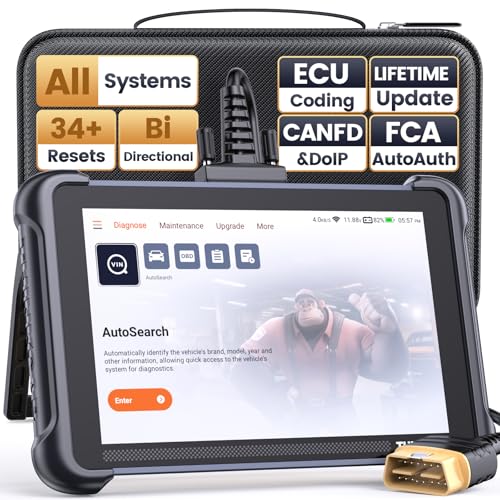
For automotive enthusiasts and professional mechanics alike, the THINKCAR THINKSCAN 689 OBD2 Scanner stands out with its impressive 34+ reset services and over 3000 active tests. This bidirectional scan tool provides full system diagnostics across multiple vehicle systems, including engine and transmission. You’ll appreciate features like ECU coding and the ability to customize settings without any renewal fees. Its user-friendly design, combined with a robust 8-inch screen and 4-core processor, makes it easy to operate. Plus, it supports over 140 brands, ensuring compatibility with a wide range of vehicles. With a 1-year warranty, it’s a smart investment for your garage.
Best For: Automotive enthusiasts and professional mechanics seeking a versatile and user-friendly diagnostic tool for a wide range of vehicles.
Pros:
- Supports over 140 brands with comprehensive full system diagnostics and active tests.
- Features 34+ reset services and ECU coding for customization and component matching.
- No renewal fees, offering dealer-level functions without additional costs.
Cons:
- Wired connection may limit mobility compared to wireless options.
- The learning curve may be steep for complete beginners unfamiliar with diagnostic tools.
- Best Sellers Rank suggests it may not be as popular as some competing models.
THINKCAR OBD2 Scanner Diagnostic Tool (ThinkScan 689)

Engineered for automotive enthusiasts and professionals alike, the THINKCAR OBD2 Scanner Diagnostic Tool (ThinkScan 689) stands out with its advanced ECU coding and bi-directional control features. With lifetime free access, you can enjoy full system diagnosis for over 10,000 vehicles across 140 brands. Its 8-inch screen and 4GB RAM make navigation a breeze. You’ll appreciate the 34 reset functions, allowing essential maintenance tasks like oil lamp resets and ECU resets. Plus, with 3000+ active tests, you can troubleshoot without driving. Enjoy 24/7 professional support, making this tool a perfect companion for your automotive diagnostic needs.
Best For: Car enthusiasts and professionals looking for an advanced, versatile diagnostic tool for extensive vehicle maintenance and troubleshooting.
Pros:
- Lifetime free access to updates and features, ensuring ongoing utility.
- Supports over 10,000 vehicles across 140+ brands, making it widely compatible.
- Advanced features such as bi-directional control and ECU coding allow for comprehensive vehicle diagnostics.
Cons:
- May have a steeper learning curve for beginners unfamiliar with automotive diagnostics.
- The 8-inch screen size might be considered small for some users who prefer larger displays.
- Regular internet access is required for some advanced features and updates.
Thinkdiag2 OBD2 Diagnostic Scanner for iOS & Android
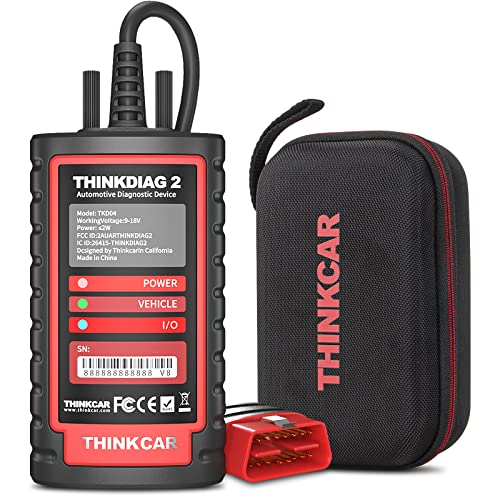
Offering full system diagnostics across various vehicle systems, Thinkdiag2 is an excellent choice for both workshops and DIY enthusiasts who need reliable and efficient vehicle analysis. This powerful OBD2 scanner connects seamlessly to your iOS or Android device via Bluetooth, supporting over 120 car brands. With bidirectional control, you can actively test components, speeding up issue identification. Plus, it offers 15+ maintenance functions, like oil reset and TPMS reset. The auto VIN function simplifies vehicle identification, ensuring accurate diagnostics every time. Enjoy this thorough tool with a 1-year update plan, making it a smart investment for any automotive enthusiast.
Best For: Thinkdiag2 is best for automotive workshops and DIY enthusiasts looking for a reliable and comprehensive diagnostic tool for vehicle analysis.
Pros:
- Full System Diagnostics: Supports a wide range of vehicle systems, providing thorough analysis and maintenance capabilities.
- Bidirectional Control: Allows for active testing of components, facilitating quicker issue identification and resolution.
- Wide Vehicle Compatibility: Works with over 120 vehicle brands, making it versatile for various automotive needs.
Cons:
- Subscription Fees: Annual renewal costs may be a deterrent for some users after the first year.
- Compatibility Limitations: Functionality may vary by vehicle model and year, requiring users to check compatibility beforehand.
- Dependency on Internet Access: Requires an internet connection for full diagnostic capabilities, which may not always be available.
THINKCAR Bidirectional Scan Tool, Thinkscan 672 OBD2 Scanner

The THINKCAR Bidirectional Scan Tool, Thinkscan 672 OBD2 Scanner, stands out with its full system OE-level diagnostics, making it an ideal choice for professionals and serious DIY enthusiasts alike. With a powerful MT8365 CPU and a 7-inch widescreen display, it guarantees you get accurate data quickly. You can perform active tests on subsystems, like injectors and coolant pumps, thanks to its bidirectional control. Plus, it supports 28 essential reset services, simplifying maintenance tasks. The scanner’s compatibility with over 140 brands and lifetime free updates assures you’ll always stay ahead in vehicle diagnostics. It’s truly a game-changer for your garage.
Best For: The THINKCAR Bidirectional Scan Tool, Thinkscan 672 OBD2 Scanner is best for automotive professionals and serious DIY enthusiasts looking for comprehensive diagnostic capabilities.
Pros:
- Full system OE-level diagnostics enables thorough vehicle analysis and troubleshooting.
- Bidirectional control allows for active tests on subsystems, enhancing diagnostic accuracy.
- Lifetime free software updates ensure the tool remains current with evolving vehicle technology.
Cons:
- Requires FCA AutoAuth for certain vehicles, which may involve additional account setup and fees.
- Limited to OBDII vehicles post-1996, potentially excluding older models.
- Complex features may require a learning curve for new users unfamiliar with advanced diagnostics.
THINKSCAN 689BT TPMS Combos – Professional OBD2 Scanner Diagnostic Tool

For automotive professionals and enthusiasts alike, the THINKSCAN 689BT TPMS Combo stands out as a top-tier choice due to its robust OBD2 diagnostic capabilities and specialized tire pressure monitoring system (TPMS) features. This tool offers extensive diagnostics, free lifetime updates, and no subscription fees. You’ll appreciate its ability to support 315/433MHz sensor activation, reading, and learning. The VENU iPro and four included tire pressure sensors enhance its functionality, allowing you to read sensor IDs, tire pressure, and battery status effortlessly. Plus, with a user-friendly interface and a 12-month warranty, it’s a reliable addition to your diagnostic toolkit.
Best For: Automotive professionals and enthusiasts seeking a comprehensive OBD2 diagnostic tool with advanced TPMS functionalities.
Pros:
- Comprehensive diagnostics with free lifetime updates and no subscription fees.
- Supports multiple TPMS functions, including sensor activation, reading, and learning for various frequencies.
- User-friendly interface with an 8-inch touchscreen and a robust Android operating system.
Cons:
- Limited to THINKCAR sensors for programming, which may restrict compatibility with other brands.
- Fault light clearance only occurs after resolving TPMS issues, which may require additional troubleshooting.
- Best Sellers Rank indicates it may not be as widely recognized compared to other established brands in the market.
THINKCAR OBD2 Scanner, ThinkScan Plus S7 Diagnostic Scan Tool

If you’re a car enthusiast or a DIY mechanic looking for a reliable diagnostic tool, the ThinkCar OBD2 Scanner, ThinkScan Plus S7, stands out with its ability to scan seven essential car systems, including the engine and ABS. It supports 94 car brands and features an Android 6.0 system with a 5-inch touchscreen. With real-time sensor data and 28 special services, you can tackle maintenance tasks easily. Plus, its AutoVIN scan helps identify vehicles quickly. With a solid warranty and customer rating of 4.2 stars, this tool is perfect for diagnosing and fixing your car’s issues effectively.
Best For: Car enthusiasts and DIY mechanics seeking a versatile diagnostic tool for comprehensive vehicle analysis.
Pros:
- Supports 94 car brands, making it versatile for various vehicles.
- Offers real-time sensor data and generates diagnostic reports for efficient troubleshooting.
- Includes 28 special services for a wide range of maintenance tasks.
Cons:
- Service functions may vary by vehicle, requiring compatibility checks before purchase.
- Clearing fault codes without repairs could lead to persistent issues.
- Some users may find the touchscreen interface less responsive compared to other models.
THINKCAR 641 Wireless OBD2 Scanner Diagnostic Tool

Equipped with thorough diagnostics for essential systems like Engine, Transmission, ABS, and SRS airbags, the THINKCAR 641 Wireless OBD2 Scanner Diagnostic Tool stands out as an ideal choice for both DIY enthusiasts and professional mechanics. It offers extensive diagnostics with fault code management and I/M readiness checks, ensuring your vehicle’s systems are functioning at their best. With Bluetooth 5.0 for wireless connectivity and a user-friendly interface, setup is quick and easy. Plus, enjoy lifetime free updates and a 3-year warranty. This scanner not only saves you money on repairs but also empowers you to tackle maintenance tasks with confidence.
Best For: The THINKCAR 641 Wireless OBD2 Scanner Diagnostic Tool is best for DIY car enthusiasts and professional mechanics looking for a comprehensive and user-friendly diagnostic solution.
Pros:
- Comprehensive Diagnostics: Offers detailed insights into Engine, Transmission, ABS, and SRS systems with fault code management.
- Wireless Functionality: Bluetooth 5.0 connectivity allows for cable-free diagnostics and quick setup.
- Lifetime Updates and Support: Enjoy lifetime free software updates and access to built-in online customer service.
Cons:
- Limited Screen Size: The 4.3-inch screen may be small for some users who prefer larger displays for better visibility.
- Android Only: The device operates on Android 8.1, which may not be compatible with all user preferences.
- Learning Curve: Some users may require time to fully understand all features and functions offered by the scanner.
Thinkdiag OBD2 Scanner Bluetooth Diagnostic Scan Tool

The Thinkdiag OBD2 Scanner Bluetooth Diagnostic Scan Tool stands out as the ideal choice for both mechanics and DIY enthusiasts seeking thorough vehicle diagnostics. It connects seamlessly to iOS and Android devices and supports over 120 car brands from 1996 onwards. With 15+ advanced reset functions like Oil Reset and ABS Bleeding, you can address various issues efficiently. This tool also offers full-system diagnostics, reading DTCs and live data. Bidirectional testing lets you actuate components, saving time. Activate the scanner with a one-year plan for full access, ensuring you stay updated on your vehicle’s health.
Best For: Mechanics and DIY enthusiasts looking for a comprehensive and user-friendly vehicle diagnostic tool.
Pros:
- Supports over 120 car brands and models from 1996 onwards, ensuring wide compatibility.
- Offers advanced reset functions and full-system diagnostics for thorough vehicle analysis.
- Bidirectional testing capabilities allow users to actuate components for efficient troubleshooting.
Cons:
- Requires a subscription for full access to features and updates, which can incur additional costs.
- Optimal functionality may be better experienced on Android devices compared to iOS.
- Initial activation and setup may be complex for some users unfamiliar with diagnostic tools.
Factors to Consider When Choosing Thinkcar Professional Automotive Scan Tools
When you’re choosing a Thinkcar professional automotive scan tool, consider the diagnostic capabilities it offers and how user-friendly the interface is. You’ll also want to check the range of vehicle compatibility and the available updates and support options. Finally, take a close look at the cost and warranty to guarantee you’re making a smart investment.
Diagnostic Capabilities Offered
Choosing the right Thinkcar professional automotive scan tool involves understanding its diagnostic capabilities. Look for tools that provide full system diagnostics, giving you access to all vehicle systems like ECM, ABS, SRS, and transmission for thorough troubleshooting. Consider options with bidirectional control, allowing you to actively test components such as fuel injectors and throttle positions without driving the vehicle. Evaluate the number of reset functions available; those with 34+ can handle vital tasks like oil resets and DPF regeneration. Real-time data display capabilities are important too, as they offer live data streams to help diagnose issues and monitor performance. Finally, verify the tool’s compatibility with over 140 vehicle brands to maximize its utility.
User Interface Design
A user-friendly interface makes a world of difference in the operation of Thinkcar professional automotive scan tools. When choosing a tool, look for one with a clear, high-resolution touchscreen display that enhances visibility of data and real-time metrics. Ergonomic design features, like physical buttons alongside touchscreen controls, improve usability and comfort during long diagnostic sessions. Additionally, tools that support multiple languages break down language barriers, making them accessible to everyone. An intuitive layout will allow you to access key functions quickly and generate diagnostic reports effortlessly. All these factors combine to boost your efficiency and satisfaction, enabling you to diagnose issues without extensive training or frustration.
Vehicle Compatibility Range
Understanding vehicle compatibility is vital for effectively diagnosing automotive issues with Thinkcar professional scan tools. When choosing a scan tool, first verify it supports OBDII-equipped vehicles built after 1996, as this is critical for most modern cars. Look for tools that cover over 140 makes and models, giving you the versatility needed for various passenger vehicles, hybrids, and SUVs. It’s also important to check compatibility with specific protocols like CANFD and FCA AutoAuth, especially for newer vehicles with SGW modules. Additionally, consider whether the tool supports multiple languages, which can be helpful in diverse regions. Finally, verify it provides thorough diagnostics across key vehicle systems, including Engine, Transmission, ABS, and SRS, for effective troubleshooting.
Update and Support Options
Staying up-to-date with software and support options can greatly enhance your experience with Thinkcar automotive scan tools. Many models offer lifetime free updates, letting you access the latest diagnostic functions without extra costs. For added convenience, the THINKCAR THINKSCAN series provides wireless updates via Wi-Fi, simplifying the process. It’s important to check if your tool requires activation for full features, as some might only offer a one-year update plan with subscription options for advanced functions. When you need assistance, Thinkcar’s customer support is typically available 24/7 through various channels, including in-app chat and email. This guarantees you get the help you need, enhancing your confidence and efficiency in vehicle diagnostics.
Cost and Warranty Analysis
When selecting Thinkcar professional automotive scan tools, cost and warranty play essential roles in your decision-making process. Many Thinkcar tools offer lifetime free updates, saving you significant costs compared to those with annual subscriptions. With a typical warranty period of 1 to 3 years, you can trust in the durability and reliability of your investment. Plus, some models come with no renewal fees, allowing you to access dealer-level functions without ongoing expenses. The 30-day return policy guarantees you can return the product if it doesn’t meet your expectations. By using Thinkcar tools, you could save hundreds of dollars annually on diagnostics and repairs, making them a smart choice for both professionals and DIY enthusiasts.